

Custom Wire Harness Label Exporter: The Ultimate Tool for Efficient Labeling
2026-09-20
Wire harness labeling often means juggling spreadsheets, label design software, and manual data entry — until now. The Custom Wire Harness Label Exporter from Xinsen turns that fragmented workflow into a single, smooth step. It pulls your harness data directly, formats it perfectly, and outputs labels ready for printing, saving hours and eliminating errors. In this post, we’ll show you exactly how it lives up to the name “the ultimate tool for efficient labeling.”
Why Manual Wire Harness Labeling Falls Short
Hand-labeling a wire harness seems straightforward until you're halfway through a complex run and realize the ink has smeared on a dozen cables. Even with careful technique, manual methods force technicians to lean over bundles, squint at tiny shrink tubes, and hope their handwriting stays legible for the next shift. The result is often a mix of smudged characters, inconsistent placement, and labels that peel away after a few thermal cycles.
Beyond the physical mess, manual processes create a bottleneck in production. Each label takes precious seconds to write, apply, and verify—seconds that multiply across hundreds of terminations. When a change order arrives, re-labeling becomes a tedious exercise in error correction. Miss one wire or misread a faded mark, and the entire assembly might pass inspection only to fail later in the field.
Perhaps the biggest shortfall is the lack of traceability. A handwritten label carries no data beyond what a tired technician scribbled at the end of a shift. There's no barcode, no timestamp, no link to the original design file. When a harness comes back with a warranty claim, you're left guessing which batch it belonged to—an expensive way to run a quality program.
Turning Complex Harness Data into Ready-to-Print Labels
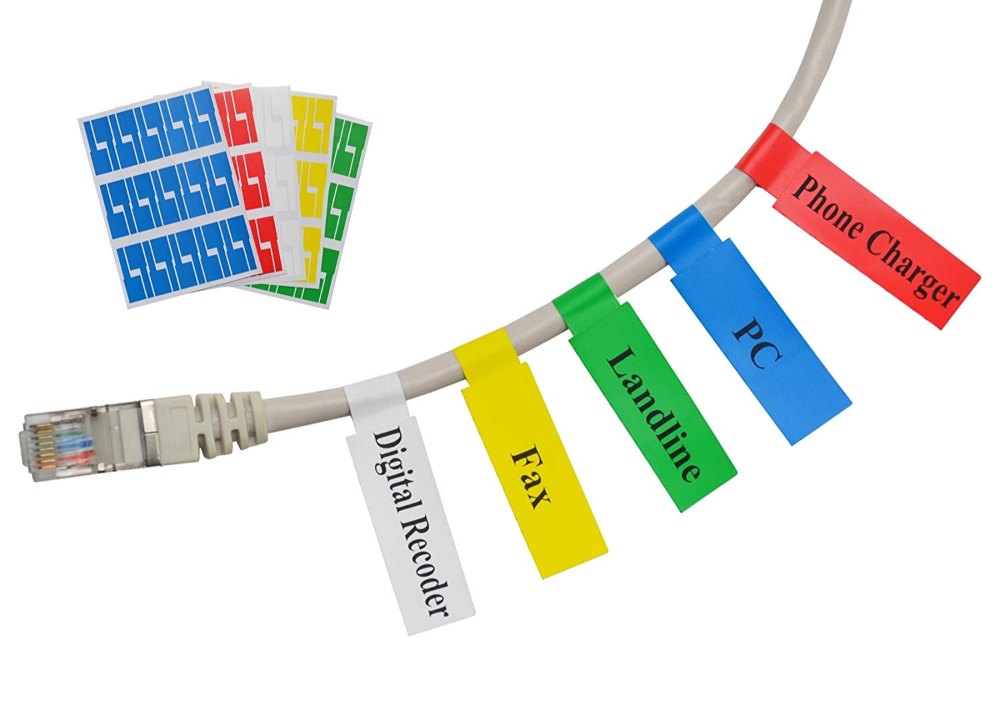
Wire harness documentation rarely arrives in a tidy format. You get spreadsheets with hundreds of wire segments, connector pinouts scattered across drawings, and BOM tables that don't align with the actual routing. Pulling all of that into a printable label set without automation means hours of copying cell values and hoping the printer doesn't choke on a mismatch. The real challenge isn't printing—it's turning fragmented engineering data into a single, coherent label stream where every wire number, gauge, and destination matches the physical harness on the bench.
A practical workflow starts with normalizing source files: stripping merged cells, splitting concatenated fields, and mapping connector references back to their pin assignments. From there, label templates need to handle variable text lengths without breaking the layout—think of a 12-character wire ID sitting next to a 3-digit terminal code, both staying inside the label boundaries. Some shops still do this by hand in a word processor, but once the harness exceeds a few dozen wires, errors creep in. A scripted conversion that reads the original BOM and outputs a printer-ready CSV or direct ZPL stream removes the guesswork and keeps the labels consistent with the as-built harness.
The payoff shows up on the production floor. Instead of cross-referencing three documents to label one connector, technicians get a single label sheet sorted by assembly order or by harness branch. Complex data doesn't disappear—it gets restructured so that every printed label carries the exact subset of information needed at that termination point. No extra columns, no truncated text, no reprinting because a wire number got transposed. The goal is simple: the label is the last step of data handling, not a separate manual task bolted onto engineering's output.
A Closer Look at Custom Label Templates That Fit Your Workflow
Most label software ships with a pile of pre-made designs, but those rarely match the way your data is actually structured. Custom templates let you map fields directly from your existing spreadsheets or databases, so the label pulls order numbers, part names, or expiration dates without manual retyping. The real payoff is consistency: every label follows the same margins, barcode density, and font sizes, which cuts down on scanning failures and reprints. You're not just changing a layout; you're aligning the label output with the logic your team already uses.
A well-built template also handles conditional content gracefully. If a product has no lot number, the field disappears instead of leaving an awkward blank. If a shipment needs both a carrier barcode and an internal tracking code, the template can shift elements without breaking alignment. This kind of rule-based design means one master template can serve multiple departments, with small variations toggled on or off per run. The goal is to remove decisions from the label-printing process, especially during busy periods when mistakes are most likely.
How the Exporter Cuts Labeling Time Without Cutting Corners
A common belief in export packaging is that faster labeling means sloppier work. Yet the exporters who consistently ship on schedule rarely sacrifice accuracy for speed. They have simply stopped relying on manual data entry and repetitive checks. Instead, they use pre-configured label templates that pull product details, quantity, and destination codes straight from the shipping documentation. This removes the back-and-forth of retyping information, which is where most errors and delays actually begin.
Another underrated time-saver is batch label approval. Rather than printing one label, walking it to a supervisor, waiting for a signature, and then repeating that for every carton, experienced exporters group labels by shipment or product line and review them in a single pass. Any corrections are made once, then pushed to the whole batch. This cuts hours from the labeling workflow without bypassing a single compliance checkpoint.
The final piece is less about software and more about setup. Keeping label stock, ribbons, and spare printheads within arm’s reach of the packing line prevents small interruptions from turning into full stops. When a label jams or runs low, the operator fixes it in seconds instead of hunting through a supply closet. The result is a labeling process that feels unhurried but finishes early — because every step has been stripped of its wasted motion, not its care.
Real-World Setups Where This Tool Removes Bottlenecks
The easiest way to spot where this tool pays for itself is to look at any pipeline that grinds to a halt when one slow step backs up. A payment processing flow that normally serializes transactions through a single queue, for example, gets breathing room when the tool fans out writes across multiple consumers and reorders retries based on failure type. Ops teams don't have to babysit dead-letter queues as often because the tool catches transient errors before they pile up.
It also removes friction in setups that run periodic heavy jobs on the same hardware as live traffic. Instead of scheduling around peak hours or spinning up separate clusters, teams let the tool throttle batch workloads in real time, giving interactive requests first dibs on CPU and I/O. That single change has cut incident counts in places where the nightly reporting job used to knock over the API for twenty minutes.
What Makes This Exporter Different from Spreadsheet Workarounds
Most teams start with a spreadsheet because it feels familiar. You paste rows, tweak columns, and eventually build a small macro that sort of works. The problem shows up later, when data volume grows or someone asks for a format the sheet was never designed to handle. This exporter skips that entire patchwork stage. Instead of relying on cell references and hidden tabs, it treats your data as structured records from the start. Every field is typed, every relationship is explicit, and the output is generated through a deterministic pipeline rather than a fragile chain of formulas.
The real difference becomes clear when you need to change something. In a spreadsheet, altering a column name often breaks three formulas you forgot about. Here, the mapping is defined once and reused everywhere. If you rename a field or add a new attribute, you update a single configuration and the next export reflects it. There is no risk of stale references, no manual copy-paste between sheets, and no version of the file where someone accidentally sorted only half the rows.
Another quiet advantage is consistency. Spreadsheets are notorious for mixed data types in the same column: a date here, a text string there, a number stored as text somewhere else. This exporter validates every value before it gets written, so the output is clean the first time. That might sound like a small thing, but it means downstream systems can trust the file without a lengthy cleanup step. For teams who have burned hours reconciling exports, that trust is worth more than any macro.
FAQ
It lets you design custom labels tailored to your wire harness specs and export them quickly, cutting down the manual formatting hassle.
Instead of reworking templates for each harness, you set your rules once and generate batches of labels in a few clicks. That removes repetitive steps and reduces errors.
Yes, the exporter supports flexible templates so you can match exact label sizes, include wire IDs, connector info, or whatever fields your project needs.
Common formats like PDF, PNG, and CSV are built in, so you can send labels straight to a printer or import them into other documentation tools.
It can pull data from spreadsheets or CAD exports, letting you reuse existing wire lists without manually retyping every entry.
The interface is kept straightforward—most people get comfortable within an hour. You don't need scripting knowledge to produce professional labels.
It focuses specifically on wire harness workflows, so features like automatic wire numbering, connector mapping, and batch export are built in instead of requiring workarounds.
Conclusion
Manual wire harness labeling is a slow, mistake-prone grind when you are juggling dozens of wire types, connector pinouts, and length callouts across a single assembly. A single misread value or a copy-paste slip from a spreadsheet turns into a mislabeled bundle, which means rework, downtime, and frustrated technicians. The Custom Wire Harness Label Exporter removes that friction by pulling directly from your harness data and turning it into ready-to-print labels without manual rekeying. Complex harness definitions—shielded pairs, twisted wires, heat-shrink tube markings—flow into a clean label layout that matches exactly what your shop floor needs. Instead of wrestling with columns and rows, you get label templates that fit your existing workflow, whether you are marking individual wires, breakouts, or full harness assemblies.
What sets this exporter apart from spreadsheet workarounds is that it does the heavy lifting in the background: it validates wire IDs, flags duplicate or missing entries, and generates labels in batch, so a whole harness run is ready in minutes rather than hours. Real-world setups show the same pattern—labeling stations that used to be the bottleneck now keep pace with the crimping and assembly line. Because the tool checks each label against the harness data before printing, you are not cutting corners; you are removing the repetitive, error-prone steps that eat up time. The result is a labeling process that feels less like a chore and more like a natural extension of your design data, with fewer returns and a cleaner, more consistent output on every build.
Contact Us
Contact Person: Yara
Email: [email protected]
Tel/WhatsApp: +86 13505426090
Website: https://www.qdxspack.com/